Showing posts with label Computer Tricks. Show all posts
Sunday, September 16, 2012

How to download torrent with Internet Download Manager(IDM)

1 comments
First of all,you need to install IDM software on your computer.

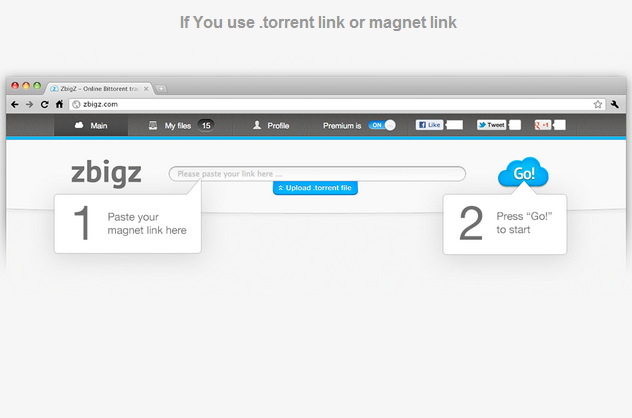
Go to http://www.zbigz.com.

Now copy a link to a torrent-file from any torrent-tracker and paste it to the input field of the upload box and hit the "GO!" button.


Click 'Upload' button which is below the input field of the upload box. Browse for torrent file on the computer and press 'GO'.


Continue reading →
Saturday, September 15, 2012

How to change Windows password from command prompt

0 comments
1.Open Command Prompt.Start >Run amd type cmd.


2.Type 'net user' and then press Enter.This will display the list of all users of that computer.


3.Type net user <username> * .Do not neglect any of the spaces.

4.Press Enter.You will be asked for the new password.The characters will not be displayed.After typing the password hit Enter.


5.Retype the password.If you get an error message or your access is denied ,your account does not have authorization to change passwords.


Continue reading →

How to write upside down on Facebook, Twitter, Myspace or Blog.

2 comments
1.Go to http://www.fliptext.org.

2.Type the text in the upper Textbox and click the 'Flip Text' button.


Continue reading →
Saturday, February 5, 2011

Trick to Hide Text in Images(Image Steganography)

0 comments
Steganography is the art and science of writing hidden messages in such a way that no one, apart from the sender and intended recipient, suspects the existence of the message, a form of security through obscurity.Many different carrier file formats can be used, but digital images are the most popular because of their frequency on the Internet.  For hiding secret information in images, there exists a large variety of steganographic techniques.Imagehide is a software that can hide loads of text in images.It is very easy to use due to its user friendly interface.Just type the text and click encrypt.If you want to decrypt,just load the image and click decrypt.


KEY FEATURES:


1.There is no increase in the image size.


2.Get past all the mail sniffers.


3.You can also print the image.


4.It can save Image files as BMP or PNG.


5.No changes are made to the image and the image looks the same to normal paint packages.


6.The text can also be protected by a password.


CLICK HERE TO DOWNLOAD IMAGEHIDE.
Continue reading →
Sunday, January 23, 2011

How to Easily boost Gaming performance

0 comments
Many times you have noticed that you have all the recommended system requirements for the game,though the performance of the game is poor .This may be due to the background running applications.Game Booster is a small utility that tweak the PC for the ultimate system and Internet speed with a single click.Game Booster close background processes and unnecessary Windows services, to speed up you game playing and avoid possible conflicts and incompatibility.It uses  "Enhanced 3rd parties services detection" technology that automatically detect and close more unnecessary background services.It defrag game directories and files, to make your games load and run faster speed.It works by tweaking system settings for gaming,cleaning RAM and intensifying processor performance.It is a free software but you can also upgrade to premium version for more benefits.


FOR MORE DETAILS,VISIT : http://www.iobit.com/gamebooster.html
Continue reading →

How to Open blocked command Prompt using Notepad

1 comments
Most of the computers that have public access to people has Command Prompt blocked due to security reasons. Some time you may want to view hidden files in the public computer using command prompt. Lack of Command Prompt will be great loss of if you want to hack in to the networking or the same pc.However you can easily open command prompt using notepad.

STEPS TO OPEN COMMAND PROMPT USING NOTEPAD :
  • Open Notepad and type the following commands:
                    @echo off
                     command
                    @echo on
  • Save the notepad file with the extension ".bat".For example "command.bat"
  • Now double click the saved  file to open the Command Prompt.

Continue reading →
Saturday, January 22, 2011

How to View Docx/Docm without Microsoft Office

0 comments
Word Viewer is a free utility by Microsoft Windows.You can view,print and copy Word documents without having Microsoft Office installed on your pc.It is a small software and also a very useful one.You can use Word Viewer and Microsoft Office Compatability Pack to open word documents saved in the following formats:

  • Word Document(.Docx)
  • Word Macro-enabled document(.Docm)
  • Text(.txt)
  • XML(.xml)
  • Word Perfect(.wpd)
  • Rich Text Format(.rtf)
  • Web Page Formats(.html)
  • Works(.wps)
Note that Word Viewer can only be used to view/print/copy documents but it cannot be used to edit documents.If you want to edit documents then you have to use Microsoft Office only.

TO DOWNLOAD WORD VIEWER CLICK ON THE LINK GIVEN GELOW:
Continue reading →

How to Unlock PDF file online

0 comments
Freemypdf is a online utility to remove password and other restrictions on PDF files.This only works for PDFs that you can open and read without any 3rd party plugins. PDFs that require a password to be viewed cannot be unlocked by this service.It is due to the fact this is not cracking.Many viewable PDFs with restrictions are not really protected, no more than a door with a broken lock, as opposed to password-protected PDFs.It is easy to use utility.You just have to select the Pdf file from your computer and click "Do it!".A download dialog box will appear where you can save the unlocked Pdf file.

MAXIMUM FILE SIZE: 150MB

FOR MORE DETAILS, VISIT:   http://freemypdf.com

Continue reading →

How to Unzip/Unrar files online

1 comments

Many times we are stuck with the problem when we download some file from internet and it is in the compressed format.If you do not have the software to extract the compressed file then you can also do it online.Wobzip is a online extractor which can also extract password protected files.It also scan the compressed files using an anti-virus scanner(bitdefender) so any infected files will be removed before you download them onto your computer.It gives you the ease to unzip your files in school, at work or anywhere as long as you have access to the Internet. No longer will you be limited by the inability to install programs onto admin-protected computers.

SUPPORTED FORMATS:  7z, ZIP, GZIP, BZIP2, TAR, RAR, CAB, ISO, ARJ, LZHCHM, Z, CPIO, RPM, DEB and NSIS

MAXIMUM FILE SIZE: 100MB

FOR MORE DETAILS,VISIT:  http://www.wobzip.org
Continue reading →
Friday, January 21, 2011

How to Make bootable USB

0 comments
Many times we are stuck with the problem when we want to install windows from USB but fail to install due to bootable issues.Follow the simple steps to make a USB bootable:

1.Go to the Start menu and click Run.

2.Type "cmd" in the Run dialog box to open the command prompt.

3.In the command prompt ,type"diskpart" without quotes and press enter.User Account Window will open ,click yes to grant access..Diskpart window will open.


4.In the diskpart window type "List volume" to get the list of volumes in your pc.Note that the USB drive should be formatted in NTFS file system to make it bootable.


5.Select the volume,type "Select Volume (volume number).If your USB volume number is 10 then type "select volume 10".The type of the USB volume is removable so you can easily recognize it.


6.Now type "active" to make to drive active and then tpye "exit" to exit diskpart.

7.Now go back to the command prompt and change the directory to dvd drive which contains windows files.To do this execute the following commands.
K: (where K is the Dvd drive letter)
k:cd boot and hit enter. Where “K” is the Dvd drive letter.
Now type"bootsect /nt60 f: " without quotes to create boot sector where "f" is the USB drive letter.

8.In the last ,copy all files/folders from DVD drive(which contains windows files) to your USB drive.

ALTERNATIVE MEHOD:

Use Bootable USB creater Tool to create bootable USB.It is a free software that offer users to make their regular USB drives into bootable ones. You can also perform a quick format with this utility.


TO DOWNLOAD THE SOFTWARE CLICK HERE. 
Continue reading →

How to Run a Trial software forever.

0 comments
Trial versions of software usually contain all the functionality of the regular version, but can only be used for a limited time.RunAsDate  is a small utility that allows you to run a program in the date and time that you specify. This utility doesn't change the current system date and time of your computer, but it only injects the date/time that you specify into the desired application.Moreover it is a free software and also a very useful one.


SYSTEM REQUIREMENTS :

RunAsDate works under Windows 2000, Windows XP, Windows Server 2003,
Windows Server 2008, Windows Vista, and Windows 7. Older versions of
Windows are not supported. The is also x64 version available in a
separated download, for using with x64 applications.


LIMITATIONS:

  • RunAsDate works on 32-bit Windows applications only. It cannot be used for 64-bit windows applications.
  • RunAsDate fail to run application which that take the current
      date/time from another source i.e. applications that loads the
      current date from remote server.Many shareware creators are smart enough to detect that the date/time was modified and when they detect the time change, they end the trial period immediately 

 For more details, visit http://nirsoft.net/utils/run_as_date.html
Continue reading →
Thursday, January 20, 2011

How to Know IP address of a computer

0 comments
There are several ways to find the IP address of a computer.This can be done online by www.whatsmyip.com or you can also use google maps to find your IP address along with your location.These online techniques however fail to get the complete profile of your network connection.To view the full profile follow the steps given below:

1.Click on the Start menu and go to Run.

2.In the Run dialog box type "cmd" to open the command prompt.

3.A DOS window will appear.Type " ipconfig/all " (without quotes) and press enter.It will show you the full network information, along with IP address of your computer.


Continue reading →
Monday, January 17, 2011

How to open Microsoft Office 2007/2010 files in Microsoft Office 2003

0 comments
Most users who have not upgrade to Microsoft Office 2007 have probably met this problem where they were unable to open the documents that are made in Office 2007.The problem arises due to the fact that Microsoft has added Open XML formats.Office Open XML is a zipped, XML-based file format developed by Microsoft.In simple words,the extension of the files are differnet. Microsoft Word 2003 save files with extension .doc, Excel 2003 with .xls and PowerPoint with .ppt but Microsoft Word 2007 save files with extension .docx, Excel 2007 with .xlsx and PowerPoint with .pptx.Therefore,there arises  compatability issue when you try to open MS Office 2007/2010 in MS Office 2003.Microsoft provide a free compatability pack known as Fileformatconverters to resolve this issue.


TO INFORMATION REGARDING THE SOFTWARE CLICK ON THE LINK BELOW :
http://www.microsoft.com/downloads/en/details.aspx?FamilyId=941b3470-3ae9-4aee-8f43-c6bb74cd1466&displaylang=en
Continue reading →
Wednesday, January 12, 2011

How to Play games Without graphic Card

0 comments
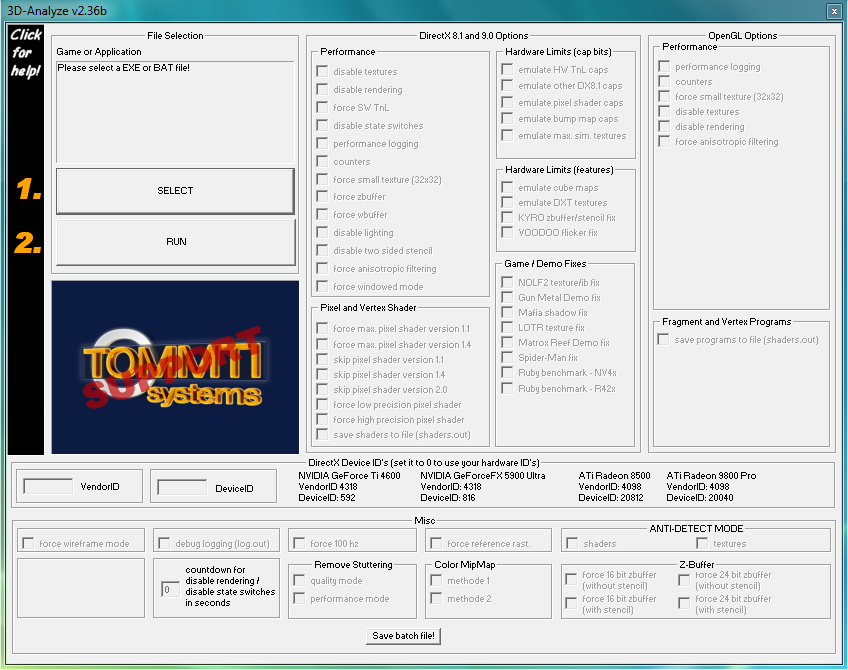
Many times we are stuck up with a system that just does not have the capability to run the latest game.In such cases using "3D analyze" may prove beneficial.3D analyze is a Graphics Card Emulator that can emulate all the feature of a 3D graphics card like pixelshader 1.1, 1.4, 2.0 ,bump maps and a lot of features.It is useful software for games that require pixel shader 2.0 or less and does not work for games that require pixel shader 3.0 or greater.Popular games that work with 3D analyze are Devil may cry 3,Resident evil 4,Prince of persia-Sands of time.


KEY FEATURES:

1.Force SW Tnl(transform and lighting)  is used to run games that require transform and lighting.
2.Force anisotropic filtering is used to force anisotropic filtering of the game.
3.Emulate HW Tnl caps used to emulate transform and lighting.
4.Force 100 hz is used to force 100 hz refresh rate for the screen.
5.Emulate pixel shader caps is used to emulate pixel shader capabilities for graphic controller.
6.Force windowed mode runs the game in windowed mode.
7.Disable lighting is  used to disable lighting effect.
8.Disable textures is used to disable textures.

LIST OF GAMES THAT WORK WITH 3D ANALYZE:


Click here to get the list of games that work with 3D analyze.

TO DOWNLOAD 3D ANALYZE CLICK ON ANY OF THE LINK GIVEN BELOW:


http://www.tommti-systems.de/main-Dateien/TOOLS/dontlinkthefile_3danalyzer-v236.exe
http://download-free.programas-gratis.net/php/download.php?id_programa=675&software-3D-Analyze-2.36
Continue reading →
Tuesday, January 4, 2011

How to easily open blocked sites

1 comments
1.Use the IP address instead of domain name:
Use the IP address instead of the URL.for example if you want to access www.facebook.com,instead of typing the URL just type the IP address.You can find the IP address by using the ping utility. To find the IP address of website follow the steps:
  •  Go to start menu and click run. 


  • In the run option,type "cmd" to open the command prompt.


  • Type "ping" and the name of the website.for example ping www.facebook.com and press enter.It will display a result similar to the following
           pinging www.facebook.com[66.220.146.32] with 32 bytes of data :


Now 66.220.146.32 is the IP address of the website.
Note that many websites do not reply to ping command.In case the ping utility fails,find the IP address online  via  www.whatsmyip.org.


2.Use online translation services:
This is the best technique to access almost all blocked websites.These translation services can be used as a web proxy.Yahoo and Google provide the best translation services.Just enter the URL of the blocked site and translate it into any language.You can later retranslate the website in the original language.Given below is a list of most frequently used translation services:

3.Use proxy sites:
Many sites enable to surf the internet anonymously.Such websites hide the original IP address and show another IP which easily bypass the restriction.
Popular proxy sites are:
http://proxy.org
http://www.bypas.in 

4.Use hotspot shield: 
Hotspot shield is a free software.It acts as a protective shield and also hides IP address for online privacy.It uses VPN technology and is easy to install and use.Click on the link given below to download hotspot shield:
http://hotspotshield.com 

5.Receive a website by email:
This method is not very effective as it fails in case of large websites but one can use it for small websites.web2mail is a website which send websites as email.

6.Use URL shortening websites:
Websites such as snipurl and tinyurl provide URL shortening services.Just enter the URL address of the blocked website and get the alternative URL address of that website.This alternative address easily bypass the restriction.

7.Use Google cache:
Use google cache feature to bypass blocked sites.Google takes a snapshot of each page it examines and  stores that version as a back-up.To use the google cache just type "cache:www.websitename.com" in the google search bar.

8.Using TOR distributive proxy:
TOR is an advanced proxy server which uses multiple anonymous servers for a single web address.It is a free software and help you defend against a form of network surveillance.It prevents the sites you visit from learning your physical location .Click on the link for more information:
http://www.torproject.org/index.html.en 


Continue reading →
Saturday, January 1, 2011

Easy way To lock/hide Folders in Windows

19 comments
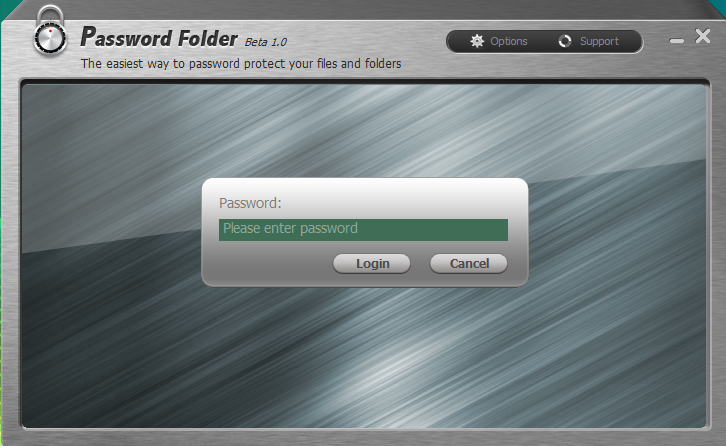
Many tips regarding locking a folder in windows is available on the internet.Most easy and effective way to lock a folder is by using "password folder".The locked data cannot be read,seen and modified.

KEY BENEFITS:


1.It is safe,secure and is free of cost.

2.It not only lock the folder but also hides it.

3.It cannot be uninstalled without entering the correct password.

4.It supports drag and drop feature i.e. you can easily lock the folder by just dragging it.

5.Provides various lock options for different level of security.

6.User friendly interface.

TO DOWNLOAD THE SOFTWARE CLICK ON ONE OF THE LINK GIVEN BELOW:


FOR MORE INFORMATION REGARDING THE SOFTWARE CLICK ON THE LINK GIVEN BELOW:

Continue reading →
Friday, December 31, 2010

Resize a partition on windows 7 or vista

0 comments
To resize a partition ,use the windows built-in disk management tool


TO SHRINK A PARTITION IN WINDOWS :

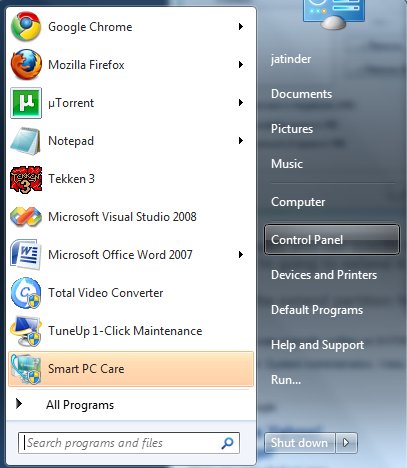
1.Go to the start menu and click on the control panel.


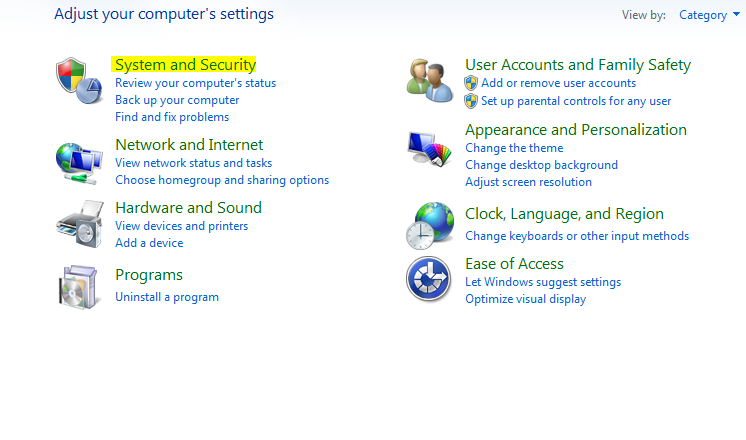
2.In the control panel,select system and security.

3.In the administrative tools,select create and format hard disk partitions.


Disk management dialog box will appear.


4.In the Disk Management screen,right-click on partition which you want to shrink and select shrink volume.


5.In the shrink dialog box ,enter the amount you want to shrink and click shrink.


TO RESIZE A PARTITION IN WINDOWS:


1.Go to the start menu and click on the control panel.


2.In the control panel,select system and security.


3.In the administrative tools,select create and format hard disk partitions.


4.In the disk management screen ,delete a partition which you dont need anymore.To delete a partition right click on the volume you want to delete and click delete volume.


5.Confirm the deletion and press "yes".


6.The volume has now been deleted,but not the partition.To delete the partition ,right click on the deleted volume and select delete partition.


7.Select "yes" to confirm.An unallocated space has been created which can be used to extend the C drive.


8.To extend the C drive,right click on the C drive and select extend volume.


9.Extend volume wizard dialog box will appear.click on the next button.


10.Then press finish.


Continue reading →
Protected by Copyscape Original Content Check
Related Posts Plugin for WordPress, Blogger...

Labels