Showing posts with label Gaming. Show all posts
Sunday, January 23, 2011

How to Easily boost Gaming performance

0 comments
Many times you have noticed that you have all the recommended system requirements for the game,though the performance of the game is poor .This may be due to the background running applications.Game Booster is a small utility that tweak the PC for the ultimate system and Internet speed with a single click.Game Booster close background processes and unnecessary Windows services, to speed up you game playing and avoid possible conflicts and incompatibility.It uses  "Enhanced 3rd parties services detection" technology that automatically detect and close more unnecessary background services.It defrag game directories and files, to make your games load and run faster speed.It works by tweaking system settings for gaming,cleaning RAM and intensifying processor performance.It is a free software but you can also upgrade to premium version for more benefits.


FOR MORE DETAILS,VISIT : http://www.iobit.com/gamebooster.html
Continue reading →
Wednesday, January 12, 2011

How to Play games Without graphic Card

0 comments
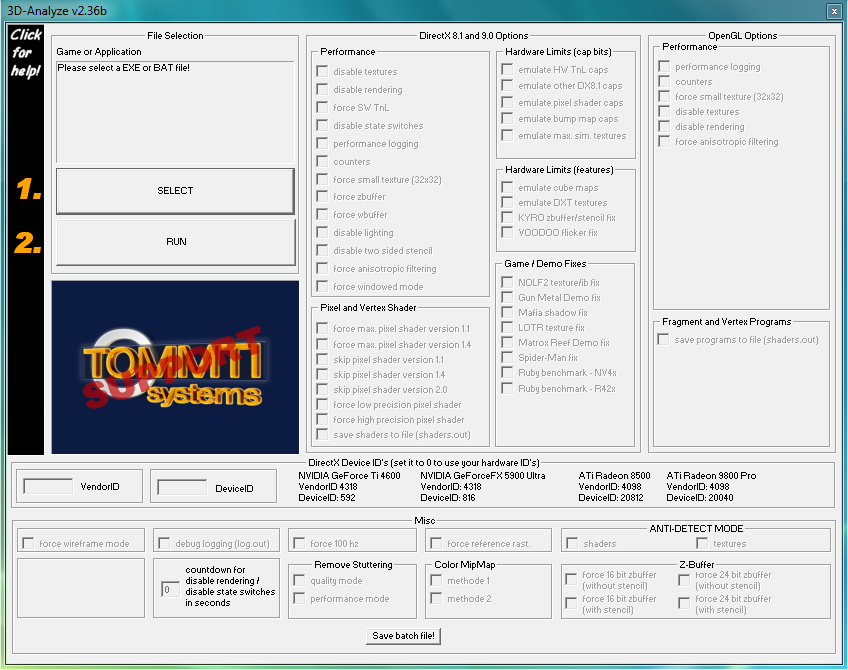
Many times we are stuck up with a system that just does not have the capability to run the latest game.In such cases using "3D analyze" may prove beneficial.3D analyze is a Graphics Card Emulator that can emulate all the feature of a 3D graphics card like pixelshader 1.1, 1.4, 2.0 ,bump maps and a lot of features.It is useful software for games that require pixel shader 2.0 or less and does not work for games that require pixel shader 3.0 or greater.Popular games that work with 3D analyze are Devil may cry 3,Resident evil 4,Prince of persia-Sands of time.


KEY FEATURES:

1.Force SW Tnl(transform and lighting)  is used to run games that require transform and lighting.
2.Force anisotropic filtering is used to force anisotropic filtering of the game.
3.Emulate HW Tnl caps used to emulate transform and lighting.
4.Force 100 hz is used to force 100 hz refresh rate for the screen.
5.Emulate pixel shader caps is used to emulate pixel shader capabilities for graphic controller.
6.Force windowed mode runs the game in windowed mode.
7.Disable lighting is  used to disable lighting effect.
8.Disable textures is used to disable textures.

LIST OF GAMES THAT WORK WITH 3D ANALYZE:


Click here to get the list of games that work with 3D analyze.

TO DOWNLOAD 3D ANALYZE CLICK ON ANY OF THE LINK GIVEN BELOW:


http://www.tommti-systems.de/main-Dateien/TOOLS/dontlinkthefile_3danalyzer-v236.exe
http://download-free.programas-gratis.net/php/download.php?id_programa=675&software-3D-Analyze-2.36
Continue reading →
Protected by Copyscape Original Content Check
Related Posts Plugin for WordPress, Blogger...

Labels