Sunday, January 16, 2011

How to Add email Signature in Gmail

2 comments
E-mail signature acts as an information and marketing block that provides pertinent and important information about you or your company to anyone that corresponds with you via e-mail. They allow anyone that receives an e-mail from you to quickly locate an easy way to contact you or your business.

STEPS TO ADD GMAIL SIGNATURE :
1.Log on to your Gmail Account.
2.Select "Settings" in the upper right corner of the page.


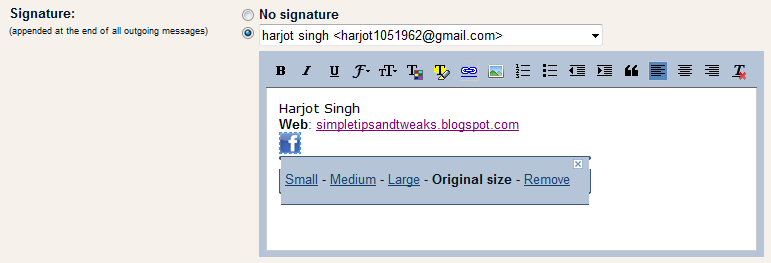
3.On the General tab, go to the Signature heading.Type the information you wish to have in your signature in the empty text box.To enter your website address ,use Link option and click Save Changes.


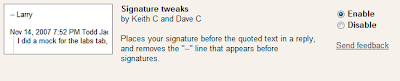
4.Go to the Labs tab and enable "Signature Tweaks".Click Save Changes to apply the changes.


STEPS TO ADD LOGO IN THE SIGNATURE:
1.Go to Google and search for the images for the logo you want in your signature. Click advanced image search and enter the image width and height of the logo as 22.For example to search Facebook logo ,enter facebook in the search bar(related to all of the words) and write "22" in both Width and Height section.Copy the URL of the image.


2.Log on to your Gmail Account.
3.Select "Settings" in the upper right corner of the page.


4. On the General tab, go to the Signature heading,Click on Insert Image in the signature section and paste the URL of the image.


5.Select the image and click on the Link option to link the image to required address.Click save changes.
6.Now go to Labs tab and enable "Inserting Images"and save the changes.

Continue reading →
Friday, January 14, 2011

How to Submit blog Sitemap to Google using Google Webmasters

0 comments
A sitemap is a graphical representation of the structural and hierarchical linkage of a web site. A sitemap is often considered as unnecessary during website making process but sitemaps play a significant role in easier navigation and better visibility by search engines.If a site is new then using a sitemap can be vital to your success.A sitemap is extremely beneficial for the indexing of pages on the site.Sitemaps can also help in the event that you have broken internal links.

STEPS TO SUBMIT A SITEMAP TO GOOGLE:

1.Go to http://www.google.com/webmasters and sign in to webmasters tools.
2.In the site section ,click on the website whose sitemap you want to submit.


3.In the dashboard,click on "Submit a sitemap" listed under the Sitemaps section.


4.Click on "Submit a Sitemap".


5.Enter the sitemap address as http://blogname.blogspot.com/feeds/posts/default and click "submit sitemap" to submit the sitemap.


Continue reading →
Wednesday, January 12, 2011

How to Play games Without graphic Card

0 comments
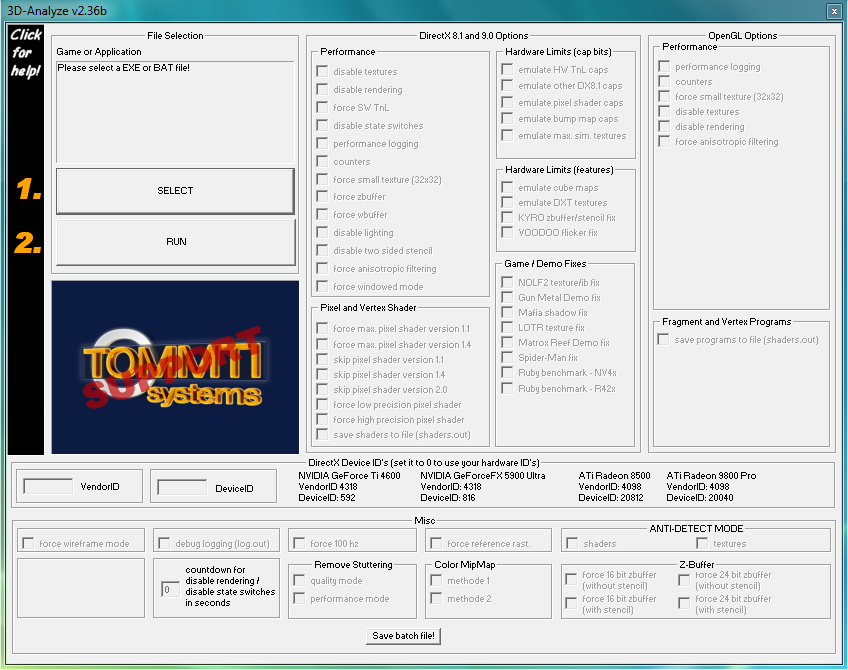
Many times we are stuck up with a system that just does not have the capability to run the latest game.In such cases using "3D analyze" may prove beneficial.3D analyze is a Graphics Card Emulator that can emulate all the feature of a 3D graphics card like pixelshader 1.1, 1.4, 2.0 ,bump maps and a lot of features.It is useful software for games that require pixel shader 2.0 or less and does not work for games that require pixel shader 3.0 or greater.Popular games that work with 3D analyze are Devil may cry 3,Resident evil 4,Prince of persia-Sands of time.


KEY FEATURES:

1.Force SW Tnl(transform and lighting)  is used to run games that require transform and lighting.
2.Force anisotropic filtering is used to force anisotropic filtering of the game.
3.Emulate HW Tnl caps used to emulate transform and lighting.
4.Force 100 hz is used to force 100 hz refresh rate for the screen.
5.Emulate pixel shader caps is used to emulate pixel shader capabilities for graphic controller.
6.Force windowed mode runs the game in windowed mode.
7.Disable lighting is  used to disable lighting effect.
8.Disable textures is used to disable textures.

LIST OF GAMES THAT WORK WITH 3D ANALYZE:


Click here to get the list of games that work with 3D analyze.

TO DOWNLOAD 3D ANALYZE CLICK ON ANY OF THE LINK GIVEN BELOW:


http://www.tommti-systems.de/main-Dateien/TOOLS/dontlinkthefile_3danalyzer-v236.exe
http://download-free.programas-gratis.net/php/download.php?id_programa=675&software-3D-Analyze-2.36
Continue reading →
Tuesday, January 4, 2011

How to easily open blocked sites

1 comments
1.Use the IP address instead of domain name:
Use the IP address instead of the URL.for example if you want to access www.facebook.com,instead of typing the URL just type the IP address.You can find the IP address by using the ping utility. To find the IP address of website follow the steps:
  •  Go to start menu and click run. 


  • In the run option,type "cmd" to open the command prompt.


  • Type "ping" and the name of the website.for example ping www.facebook.com and press enter.It will display a result similar to the following
           pinging www.facebook.com[66.220.146.32] with 32 bytes of data :


Now 66.220.146.32 is the IP address of the website.
Note that many websites do not reply to ping command.In case the ping utility fails,find the IP address online  via  www.whatsmyip.org.


2.Use online translation services:
This is the best technique to access almost all blocked websites.These translation services can be used as a web proxy.Yahoo and Google provide the best translation services.Just enter the URL of the blocked site and translate it into any language.You can later retranslate the website in the original language.Given below is a list of most frequently used translation services:

3.Use proxy sites:
Many sites enable to surf the internet anonymously.Such websites hide the original IP address and show another IP which easily bypass the restriction.
Popular proxy sites are:
http://proxy.org
http://www.bypas.in 

4.Use hotspot shield: 
Hotspot shield is a free software.It acts as a protective shield and also hides IP address for online privacy.It uses VPN technology and is easy to install and use.Click on the link given below to download hotspot shield:
http://hotspotshield.com 

5.Receive a website by email:
This method is not very effective as it fails in case of large websites but one can use it for small websites.web2mail is a website which send websites as email.

6.Use URL shortening websites:
Websites such as snipurl and tinyurl provide URL shortening services.Just enter the URL address of the blocked website and get the alternative URL address of that website.This alternative address easily bypass the restriction.

7.Use Google cache:
Use google cache feature to bypass blocked sites.Google takes a snapshot of each page it examines and  stores that version as a back-up.To use the google cache just type "cache:www.websitename.com" in the google search bar.

8.Using TOR distributive proxy:
TOR is an advanced proxy server which uses multiple anonymous servers for a single web address.It is a free software and help you defend against a form of network surveillance.It prevents the sites you visit from learning your physical location .Click on the link for more information:
http://www.torproject.org/index.html.en 


Continue reading →
Saturday, January 1, 2011

Easy way To lock/hide Folders in Windows

19 comments
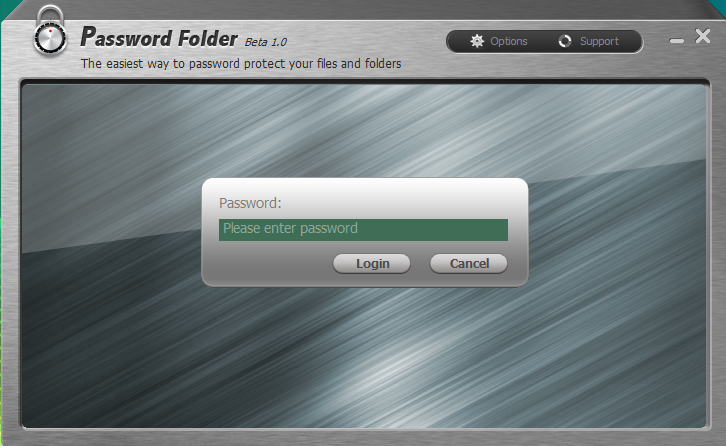
Many tips regarding locking a folder in windows is available on the internet.Most easy and effective way to lock a folder is by using "password folder".The locked data cannot be read,seen and modified.

KEY BENEFITS:


1.It is safe,secure and is free of cost.

2.It not only lock the folder but also hides it.

3.It cannot be uninstalled without entering the correct password.

4.It supports drag and drop feature i.e. you can easily lock the folder by just dragging it.

5.Provides various lock options for different level of security.

6.User friendly interface.

TO DOWNLOAD THE SOFTWARE CLICK ON ONE OF THE LINK GIVEN BELOW:


FOR MORE INFORMATION REGARDING THE SOFTWARE CLICK ON THE LINK GIVEN BELOW:

Continue reading →
Protected by Copyscape Original Content Check
Related Posts Plugin for WordPress, Blogger...

Labels